
For paediatricians and children's clinics
Curogrid Paeds: software for children's clinics
Growth charts, vaccines and syrups, made for a children's clinic. Parents see how their child is growing.
From ₹420 a month for the whole clinic. 5 days free.
Growth
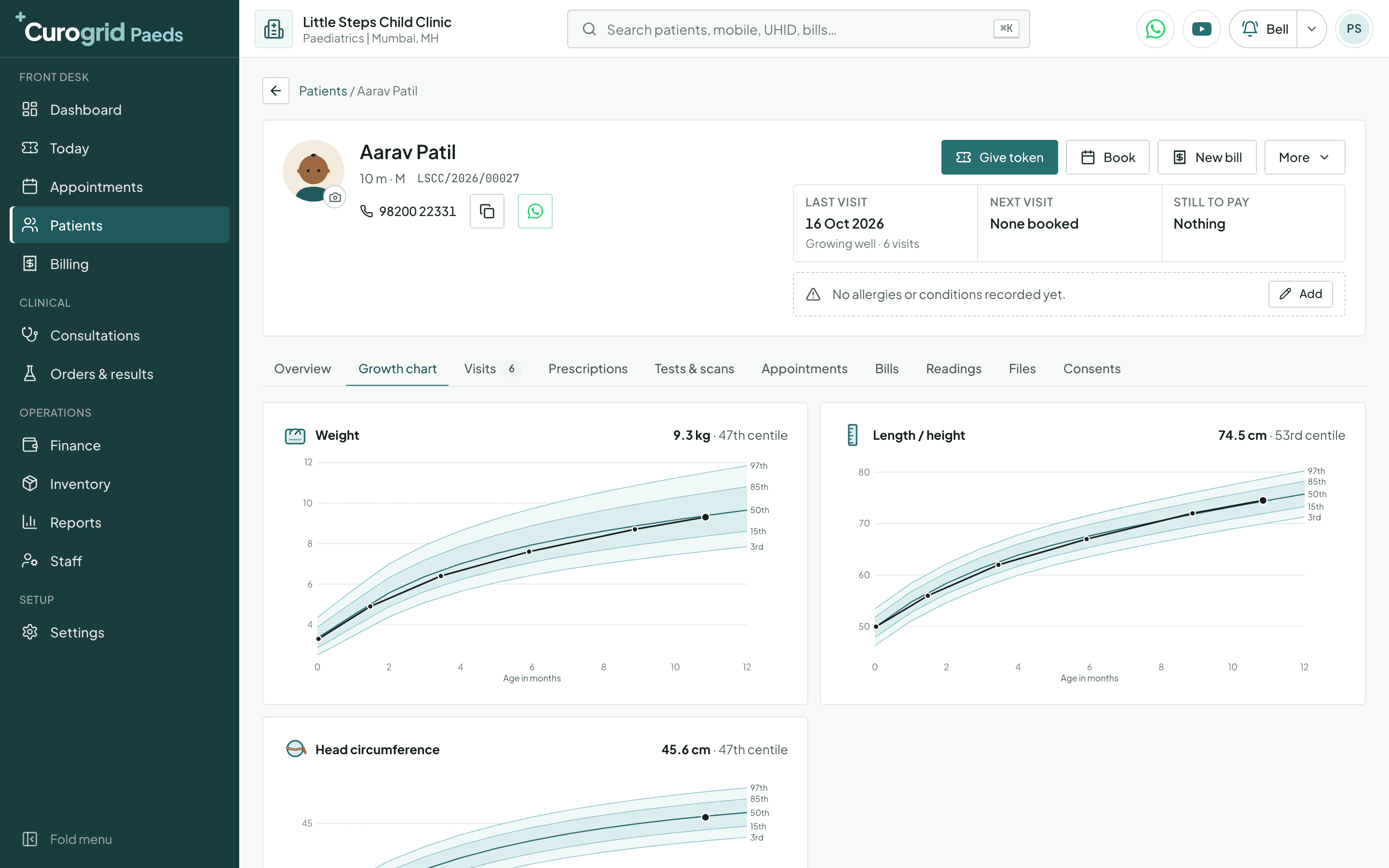
The WHO growth chart, drawn from your own visits
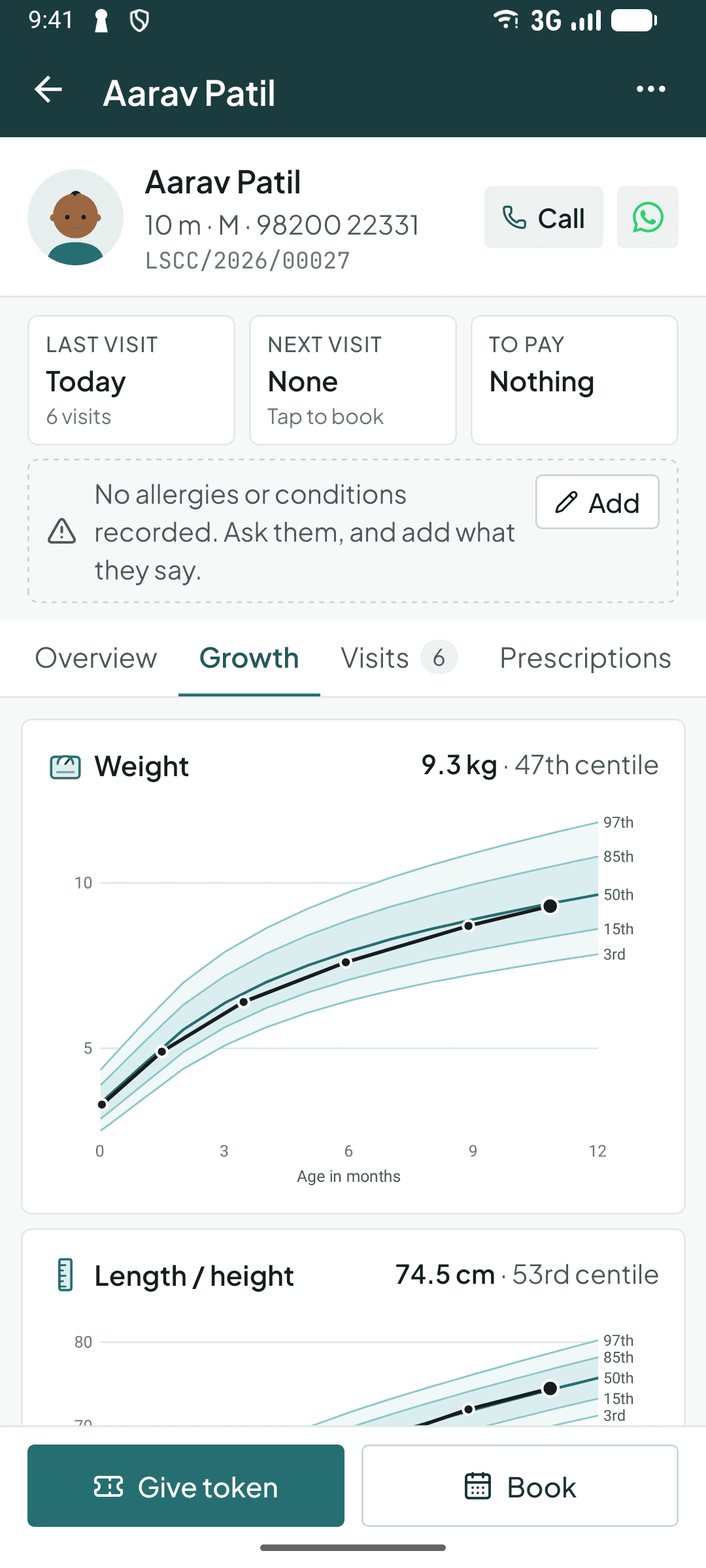
A parent asks one question at every visit: is my child growing well? Curogrid Paeds answers it on the screen. Each weight, length and head circumference you record is placed on the WHO chart for the child's sex, and the latest is read out with its centile.
- Answer “is my child growing well?” on the screen
- WHO centiles worked out for you
- Weight, length and head charted from your own visits
See everything it records
What the Growth chart tab shows
- Weight
- By age in months, on the WHO bands from the 3rd to the 97th centile, with the 50th as the middle line.
- Length or height
- The same bands, with the child's own measurements joined up.
- Head circumference
- Measured under two years, on its own chart.
- The centile
- Read out beside each chart: “9.3 kg, 47th centile”, “below the 3rd” or “above the 97th”.
The charts need the child's date of birth and sex, and say so when either is missing. They run from birth to two years. The phone app shows the same charts.
Vaccines
Every vaccine from the date of birth, and the next one never forgotten
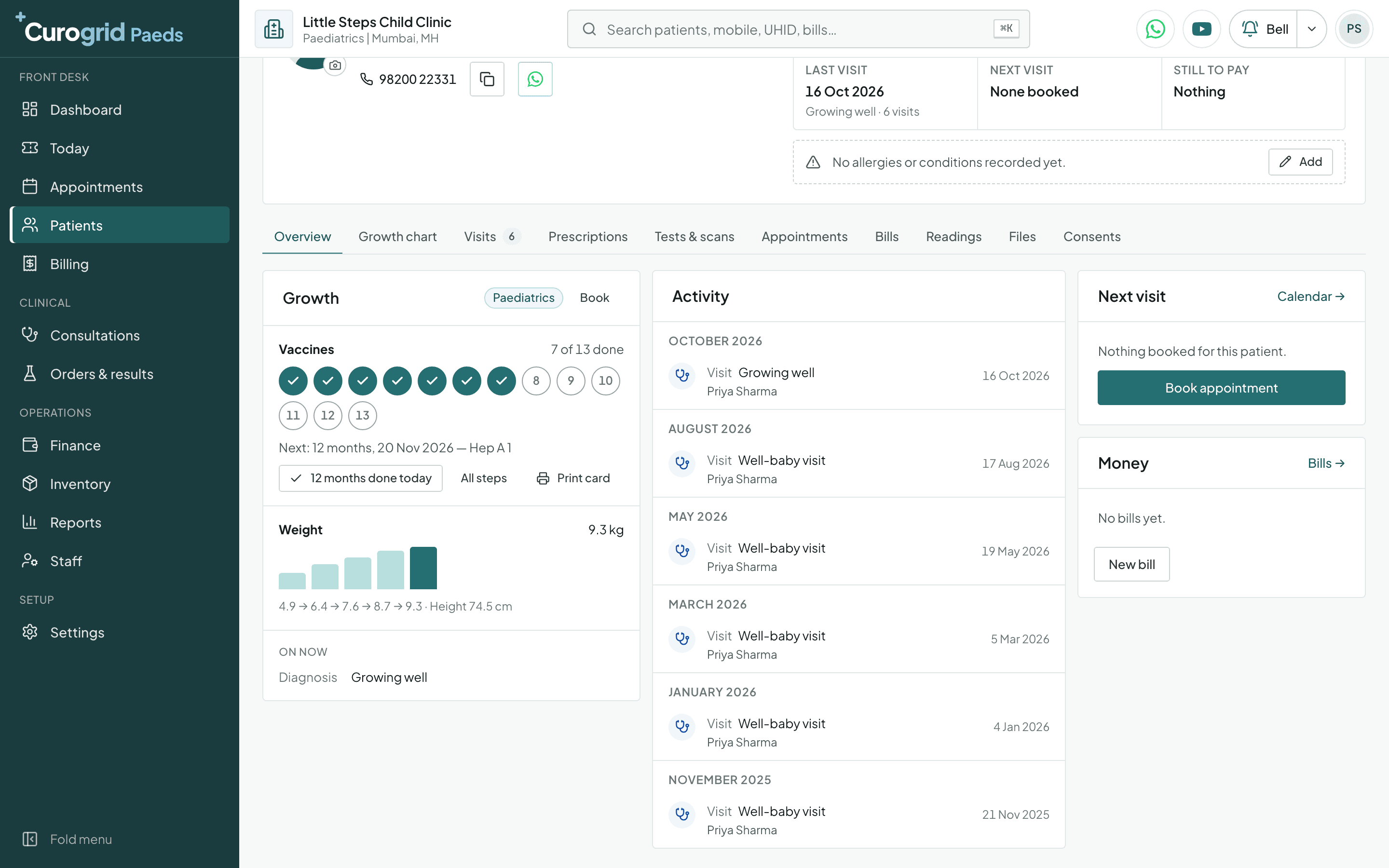
Start the vaccine plan once and Curogrid lays out the whole schedule from the child's date of birth. The file shows how many steps are done and what is due next; one tap marks today's vaccines given.
- Every vaccine dated from the date of birth
- Parents can be reminded the day before
- A printed vaccination card for every child
See everything it records
The 13 steps of the plan, on the IAP schedule
- At birth
- BCG, OPV 0, Hep B 1
- 6 weeks
- DTP 1, IPV 1, Hib 1, Hep B 2, Rotavirus 1, PCV 1
- 10 weeks
- DTP 2, IPV 2, Hib 2, Hep B 3, Rotavirus 2, PCV 2
- 14 weeks
- DTP 3, IPV 3, Hib 3, Hep B 4, Rotavirus 3, PCV 3
- 6 and 7 months
- Influenza 1, then Influenza 2
- 9 months
- MMR 1, Typhoid conjugate
- 12 months
- Hep A 1
- 15 months
- MMR 2, Varicella 1, PCV booster
- 16 to 18 months
- DTP booster 1, IPV booster, Hib booster
- 18 months
- Hep A 2, Varicella 2
- 4 to 6 years
- DTP booster 2, MMR 3
- 10 to 12 years
- Tdap, HPV
The vaccination card
Print the plan as a card on your letterhead: every step with its due date, the day it was given, and a column to sign. Bring it to every visit.
The dashboard lists every child whose next step is due this week, the late ones first. Switch on “Care plan reminder” in Notifications and the parent gets a WhatsApp message the day before.
The child's visit
A visit form for a child, not a small adult
The first visit asks what a paediatrician asks; a review is three quick parts. Weight, height and temperature are in the visit's vitals as usual.
- A child's visit in taps, not paragraphs
- Milestones ticked at every visit
- Birth details asked once, kept forever
See everything it records
The first visit: Child
- Brought by
- Mother, father, grandparent or someone else.
- Feeding
- Breastfed, formula, mixed feeding, family food, eats poorly, picky eater.
- Milestones reached
- Tick what the child does now: social smile, holds head, sits, crawls, stands, walks, says words, runs, speaks sentences.
- Vaccines
- Up to date, due now, behind or not known.
- Head circumference
- In centimetres, under two years.
- Looks
- Active, playful, irritable, drowsy, pale, dehydrated, rash, jaundice.
- Findings
- Ready words such as “Chest clear” and “No neck stiffness”.
At registration, asked once
- Birth weight
- In kilograms.
- Born at
- Full term, early (preterm) or late.
- Delivery
- Normal, caesarean or assisted.
- Feeding
- Breast milk, formula, both or family food.
- Review visit
- Since last visit (better, same, worse, fever gone, eating well), how the child looks, and notes such as “Weight gained”.
The whole clinic
Front desk, money and team, in one place
Tokens, appointments, bills, staff and the day's takings, on the computer and the phone.
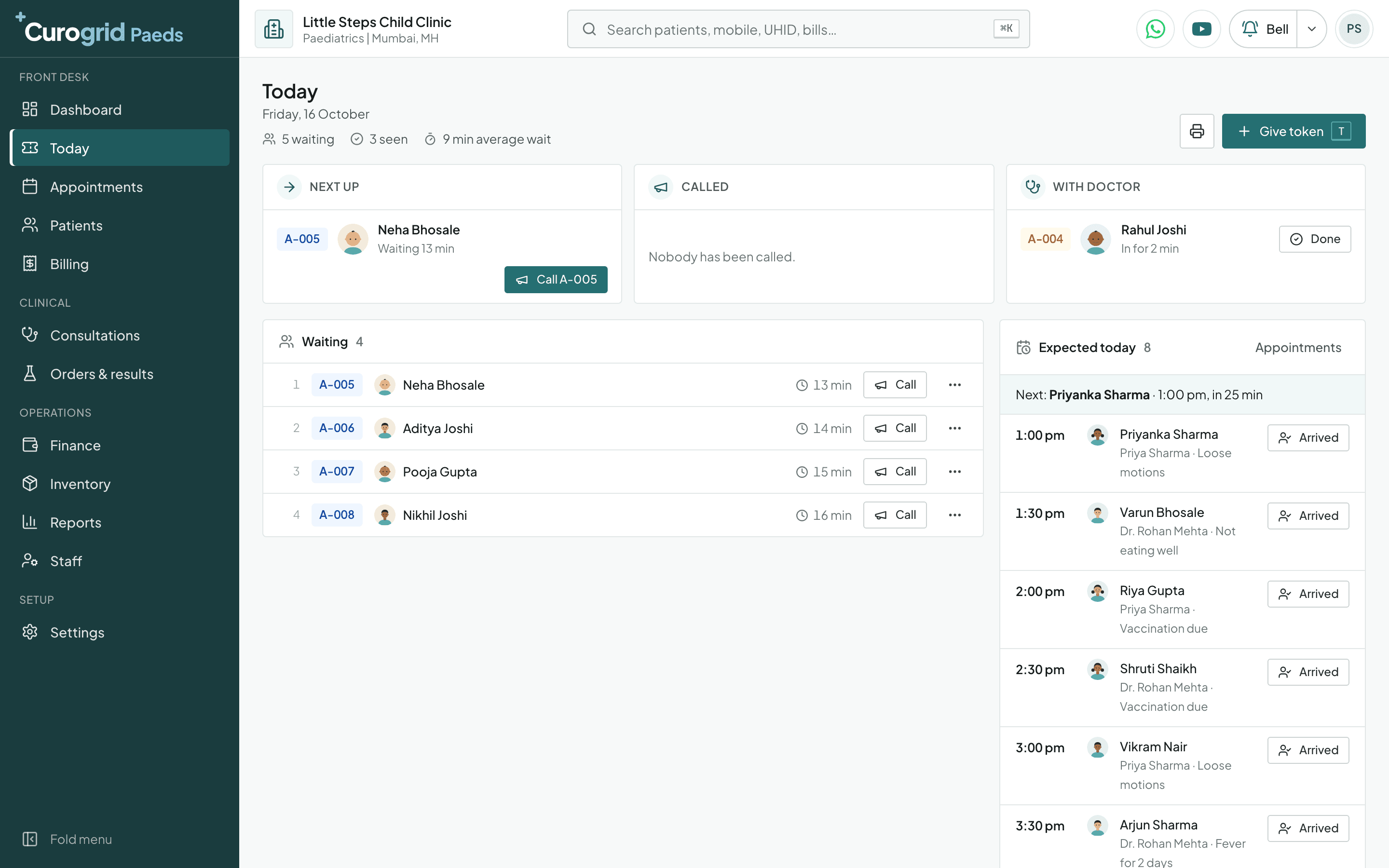
Today's line 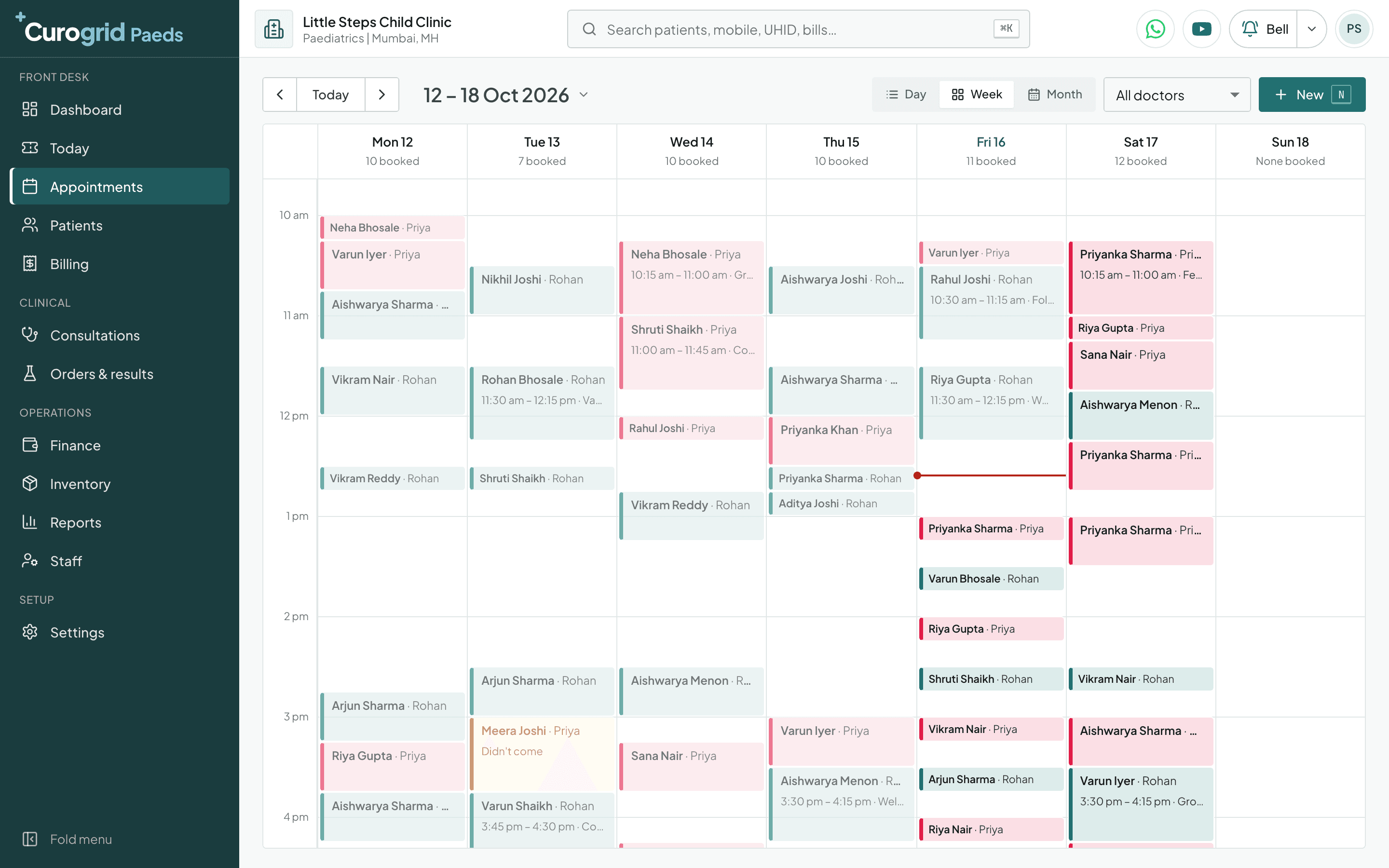
The appointment book 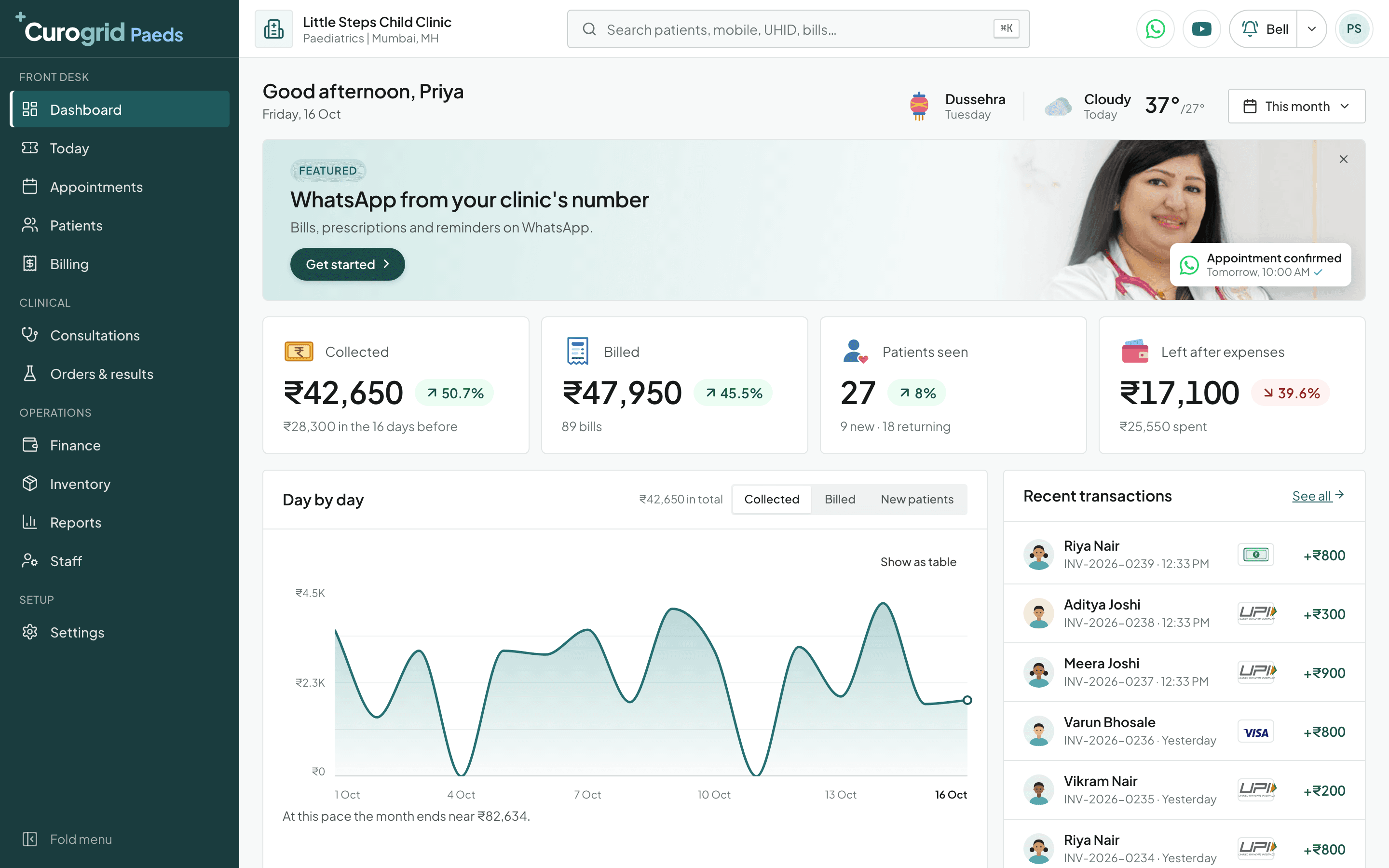
The owner's dashboard 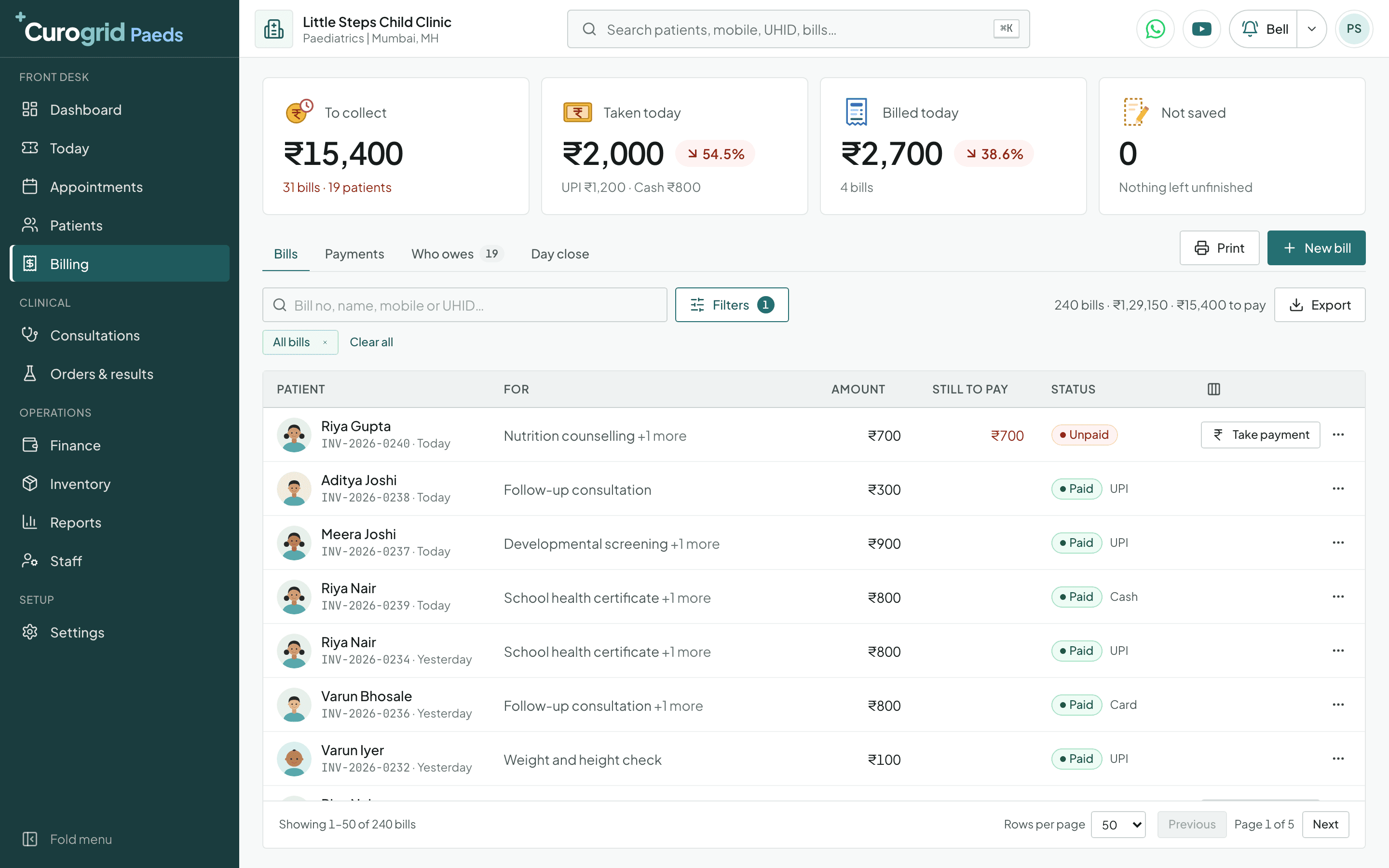
Billing by UPI, card and cash
A child's visit to the clinic, step by step
1. Before the visit
The booking and the reminder. The desk books the visit, and the parent gets a reminder before it on WhatsApp and by email.
2. At the desk
Registered once, with the birth details. The child's name, date of birth and sex, the parent's name and mobile number, and four birth questions: birth weight, born at term or early, the delivery and the feeding.
3. In the waiting area
A baby goes ahead. The desk gives a token and marks it “Baby under 2”. It is placed ahead of normal tokens, and the tag shows in the doctor's line.
4. Before the doctor
Weight, length and temperature. The sister records the vitals. The weight and length go straight onto the growth chart.
5. In the doctor's room
The growth chart, then the visit. The centile is read out, and the visit asks who brought the child, feeding, milestones and vaccines. The diagnosis, such as bronchiolitis or croup, is searched by its everyday name.
6. Writing the prescription
Syrups and drops, and the dose you write. The children's forms are offered ahead of adult tablets. You write the dose; “Every 6 hours” and “By mouth with the dropper” are ready to pick. If the child is allergic to a medicine you write, a red warning says so.
7. Vaccination
Tick the step, count the vial. Mark today's vaccines given in one tap. The vaccine is kept in Stock with its batch and expiry, and giving it brings the shelf count down; the visit charge goes on the bill.
8. At the counter
Bill, card and the next date. The parent pays by UPI, cash or card, takes the printed vaccination card, and the next step's date is already on the child's file.
9. Through the year
Due this week. The dashboard lists the children whose next vaccine is due, the late ones first, each a tap from their file. With reminders on, the parent is messaged the day before.
On the phone
Your clinic in your pocket
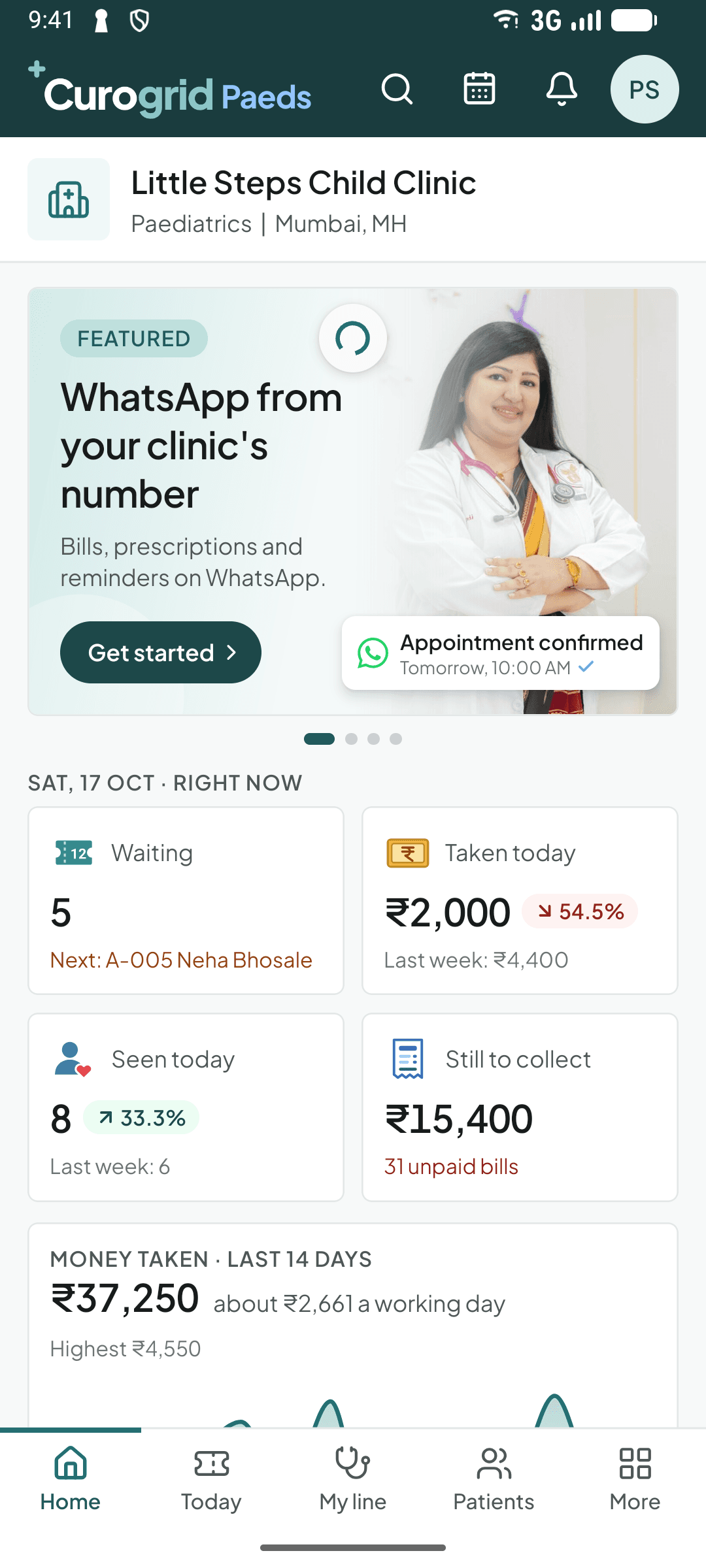
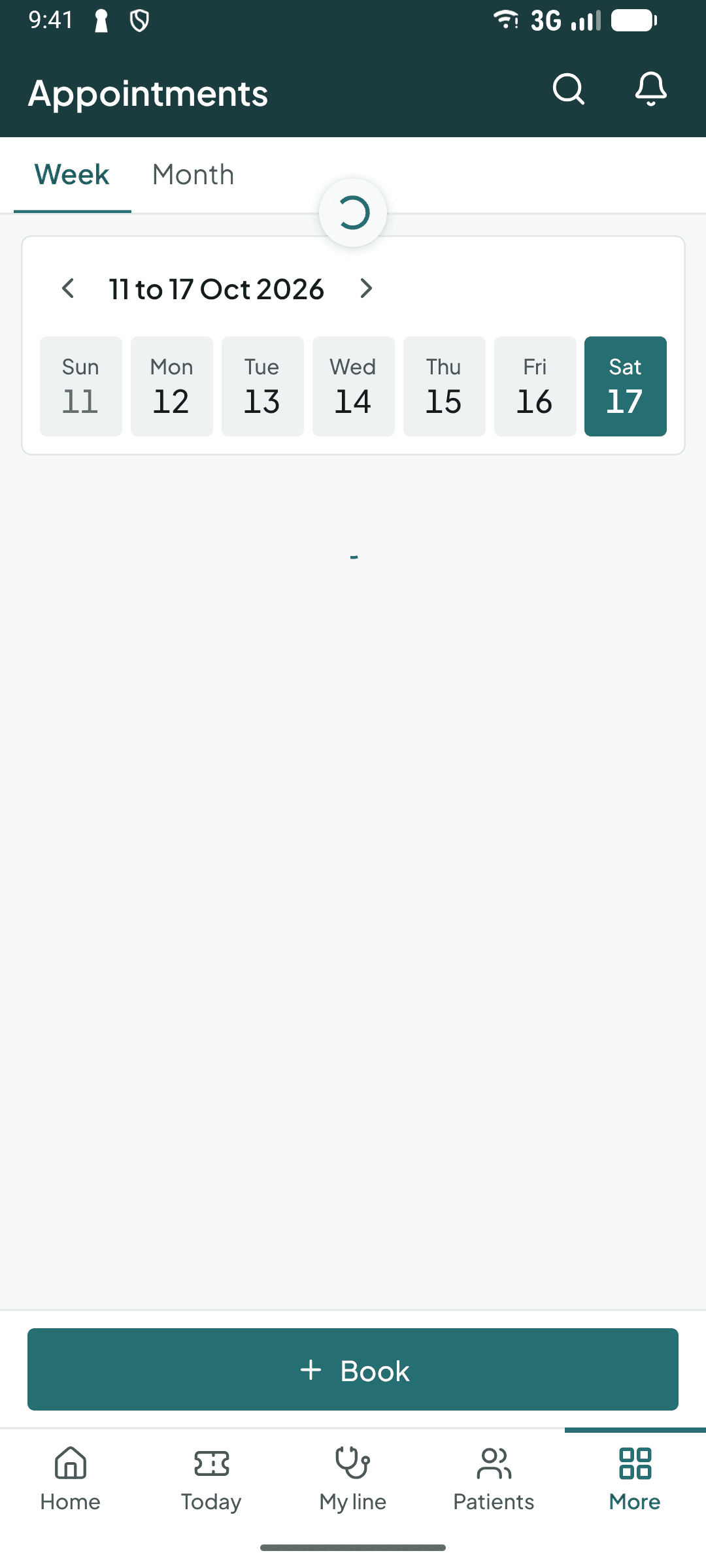
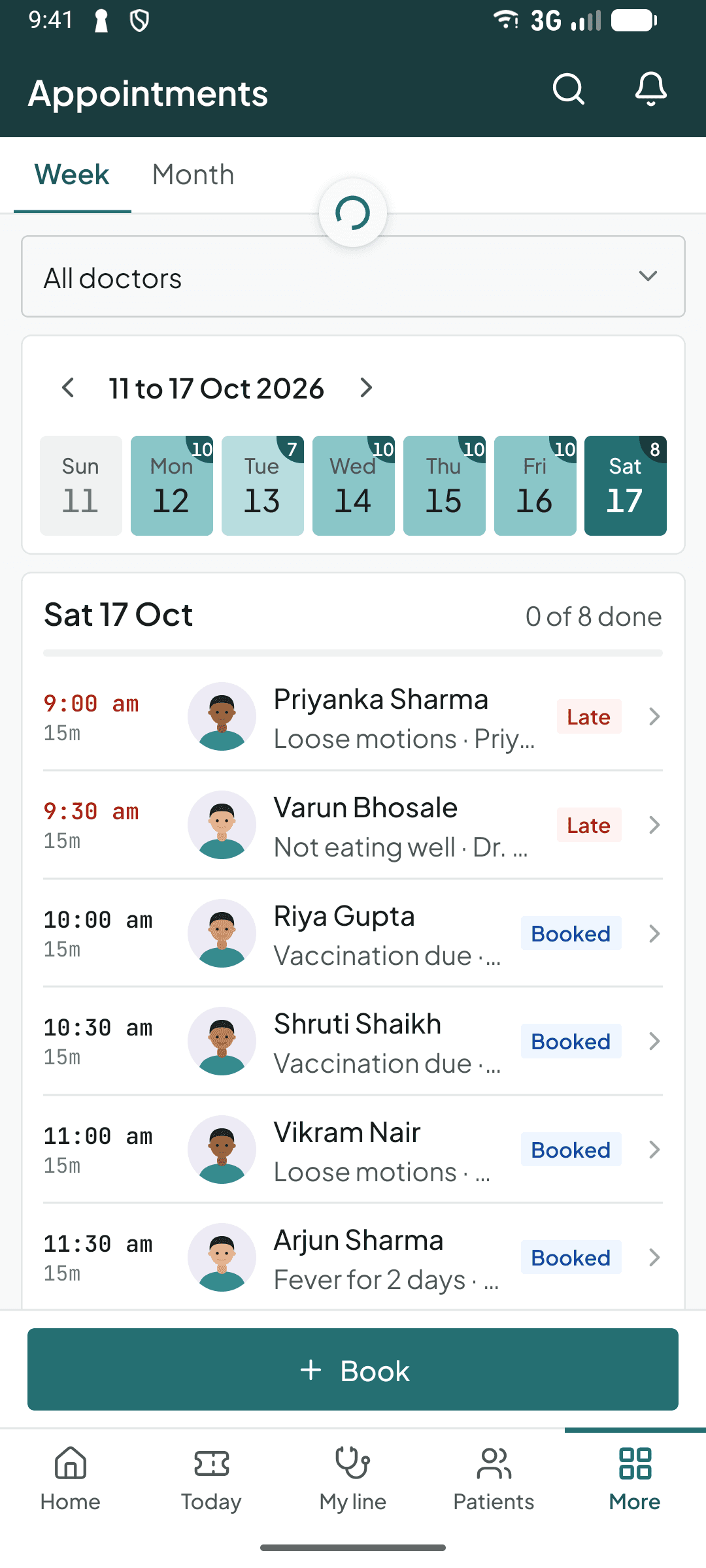
The same Curogrid Paeds on Android and iPhone, for the doctor, the front desk and the owner.
- See the line and call the next patient from anywhere
- Open a patient's file, write the visit, take the payment
- Today's appointments and takings, wherever you are
From ₹420 a month, for the whole clinic
Not per doctor. Everything on this page is included. Start with 5 days of Pro, free.
Questions from paediatricians
Yes. Weight, length or height and head circumference from each visit are drawn on the WHO charts for the child's sex, from birth to two years, with the 3rd, 15th, 50th, 85th and 97th centile lines. The latest measurement is read out with its centile, such as “74.5 cm, 53rd centile”. It needs the child's date of birth and sex.
Yes. Start the vaccine plan and Curogrid lays out the IAP schedule from the date of birth in 13 steps, from BCG, OPV and Hep B at birth to Tdap and HPV at 10 to 12 years. Tick each step when it is given. The child's file shows how many are done and the next one due, and you can print the vaccination card.
Yes, once you switch it on. Curogrid can send the parent a WhatsApp message the day before the next step falls due. It is off until the clinic turns on “Care plan reminder” in Notifications, because each message costs the clinic. The dashboard also lists every child whose next vaccine is due this week, the late ones first.
The visit is billed as a service, “Immunisation, visit charge”, at a starter price of ₹200. The vaccine itself is kept in Stock, because it comes in batches and expires, so each vial has a batch number and an expiry date and the stock list warns you before it runs out or expires.
Yes. Paediatrics adds 29 children's medicine names: syrups, drops, suspensions, sachets and nebuliser solutions. They are offered ahead of the general list. Curogrid offers the name only. The dose is always the doctor's to write.
No. The weight is recorded at the visit and shown beside the prescription. Curogrid has no dose calculator and never suggests a dose.
Yes. The child's first visit has a milestones checklist, from social smile and holding the head to walking and speaking sentences, and a box for head circumference under two years. The review visit records whether the child is better, eating well or still coughing.
Yes. A token can be marked “Baby under 2” at the desk. It is placed ahead of normal tokens, and the tag shows beside the name in the doctor's line.
The parent or guardian. The form is read on the screen and signed with a finger, and the person signing is recorded as the patient, a parent or guardian, or a relative. The signed form is kept in the child's file under Consents.
Yes, for Android and iPhone. The doctor sees the line, writes the visit and opens a child's growth chart on the phone. Curogrid also runs in a web browser and as a Windows app.
Curogrid Plus is ₹420 a month and Pro is ₹999 a month, or ₹4,032 and ₹9,590 for a year. GST of 18% is added. The price is for the whole clinic, not for each doctor, and the Paediatrics setup is included in both plans. Every clinic starts with 5 days of Pro, free.
Yes. Curogrid sends the patient a reminder before the appointment by WhatsApp and email, and can send the prescription, the bill and the receipt the same way. On Plus the WhatsApp messages go from the Curogrid number. On Pro they go from your clinic's own number.
Not yet. A patient's 14-digit ABHA number can be recorded on their file, where it is marked as not checked with ABDM. Curogrid does not yet verify an ABHA number, create one or share records through ABDM.
No. Curogrid needs an internet connection. The phone app tells you when it is offline and saves nothing until the connection is back, and on a computer a visit you are typing is kept on that computer until it can be saved. The screens are in English only.
Good to know
Registrations and rules for a paediatric clinic in India, what Curogrid does not do, and the lists it offers. The rules are a plain summary, not legal advice, checked on .
Only a doctor on a State Medical Register or the Indian Medical Register may practise medicine, and the registration number belongs on every prescription, certificate and receipt you sign. The NMC's 2023 conduct regulations were put on hold in August 2023, so the 2002 code of ethics still applies. In Curogrid: Each doctor's qualifications, registration number and council are kept on their staff profile and print under their name on every prescription.
In the states and union territories that have adopted the Act, a clinic cannot run without registering with the district registering authority, and national minimum standards are set for each kind of clinic. Other states have their own registration law. Your district health office will say which applies. In Curogrid: Curogrid does not register your clinic. Your clinic's name, address and contact numbers print on every bill and paper it makes.
A serious event after a vaccine, one that needs a hospital or leads to disability or death, is reported to the District Immunization Officer within 24 hours on the case reporting form. Minor events go in the monthly report. In Curogrid: Curogrid does not send AEFI reports. The vaccination visit is on record, and Stock keeps each vaccine's batch number and expiry.
Anyone who knows or suspects that a child has been sexually abused, a doctor included, must report it to the police or the Special Juvenile Police Unit. Not reporting is an offence, punishable with up to six months in prison, a fine, or both. In Curogrid: Curogrid does not report to the police. What you saw and did is kept on the visit, with photos and reports in the child's file.
The Act protects breastfeeding. A clinic may not display posters for infant formula, feeding bottles or infant foods, or pass on company samples and gifts to mothers, and what companies tell health workers is limited to scientific facts. In Curogrid: Curogrid shows no advertising. “Formula” is only an answer to the feeding question on the child's visit.
Explain what you will do, why, and its risks before you start, and keep the patient's agreement. For a child, a parent or guardian agrees. Curogrid fills in the guardian's name from the child's record. In Curogrid: The setup adds an “Examination and treatment plan” and a “Procedure or operation” consent form. The patient, a parent or guardian, or a relative signs with a finger on the screen, and the form is kept in the patient's file.
Used vaccine syringes and needles are sharps. Separate waste where it is made, put sharps in a puncture-proof white translucent container, hand it to your area's common bio-medical waste facility, and train the staff who handle it. In Curogrid: Curogrid does not manage waste. Vaccines are kept in Stock with their batch number and expiry date, and the stock list warns you before one expires.
A patient's record is personal data, and the clinic is responsible for it. Tell patients what you keep and why, keep it safe, use it for their care, and let a patient see or correct what you hold. The Rules were notified in November 2025 and most of their duties for clinics apply from May 2027. In Curogrid: Every member of the team has their own sign-in and role, so the records show who did what, and nobody shares a password.
Health care by a clinical establishment or an authorised medical practitioner is exempt from GST: the diagnosis, treatment or care of an illness, injury or pregnancy. Anything sold or done outside that, such as a cosmetic product, may be taxed. Ask your chartered accountant what applies to your clinic. In Curogrid: A GST rate is set on a service only if you give it one, so taxable and exempt services can sit on the same bill. The clinic's GSTIN is needed only if you are registered.
The WHO charts are drawn from birth to two years. After that the child's weight and height are kept and drawn as their own lines over time, without the centile bands.
The weight is recorded and shown on the visit. The dose is typed by the doctor. Curogrid has no dose calculator and never suggests one.
The plan follows the IAP schedule in its own steps. A government UIP schedule, or your own changes to the steps, are not offered yet. You tick what was given and can stop a plan with a reason.
School health certificate is a service on the price list, so it can be billed. The certificate itself is written on your own letterhead.
Beds, admissions, a NICU record and the discharge summary are not built. Curogrid is for the clinic and the OPD.
Curogrid does not send vaccination or AEFI reports to the health department or the U-WIN portal. Those are filed as you file them today.
Paracetamol 120 mg/5 ml syrup, Paracetamol drops 100 mg/ml, Ibuprofen 100 mg/5 ml syrup, Amoxicillin 250 mg/5 ml syrup, Amoxicillin + Clavulanate 228.5 mg/5 ml syrup, Cefixime 50 mg/5 ml syrup, Cefpodoxime 50 mg/5 ml syrup, Azithromycin 100 mg/5 ml syrup, Cetirizine 5 mg/5 ml syrup, Levocetirizine 2.5 mg/5 ml syrup, Ondansetron 2 mg/5 ml syrup, Domperidone 1 mg/ml suspension, Zinc 20 mg/5 ml syrup, ORS sachet, Probiotic sachet, Salbutamol 2 mg/5 ml syrup, Salbutamol nebuliser solution, Budesonide nebuliser suspension, Montelukast 4 mg chewable tablet, Prednisolone 5 mg/5 ml syrup, Albendazole 200 mg/5 ml suspension, Lactulose syrup, Simethicone drops, Saline nasal drops, Vitamin D3 400 IU drops, Multivitamin drops, Iron drops, Calcium syrup, Calamine lotion.
CBC with peripheral smear, Urine culture, Serum bilirubin, Blood culture, Mantoux test.
Vaccination, Nebulisation, Growth check.
Acute upper respiratory infection, Acute bronchiolitis, Acute obstructive laryngitis (croup), Rotaviral enteritis, Otitis media, Acute tonsillitis, Febrile convulsions, Neonatal jaundice, Enteroviral vesicular stomatitis with exanthem (hand, foot and mouth disease), Varicella without complication, Measles without complication, Mumps without complication, Diaper (napkin) dermatitis, Rickets, active, Other lack of expected normal physiological development (poor weight gain), Developmental disorder of speech and language (speech delay), Nonorganic enuresis (bedwetting), Routine child health examination, Need for immunization against unspecified combinations of infectious diseases.
Try Curogrid Paeds in your clinic
5 days of Pro, free. Pick “Paediatrics” in setup and the growth charts, the vaccine plan, the children's medicines and your services are ready before your first patient.